



Kurrent is an old form of German-language handwriting based on late medieval cursivewriting, also known as Kurrentschrift (“cursive script”), deutsche Schreibschrift (“German script”), and German cursive. It remained in used until the first half of the 20th century in Germany and so type foundries offered various typefaces in this style, both for formal script use and advertising purposes.
Linked Typefaces:


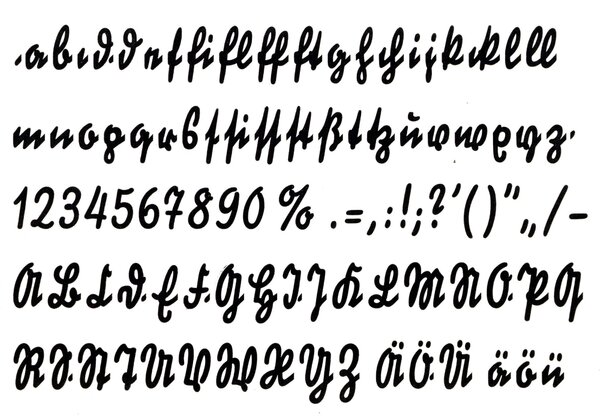


Balmung // LLT2402
Balmung is a typeface designed by Theodor Paul Etbauer, published by D. Stempel AG
Balmung is a typeface designed by Theodor Paul Etbauer, published by D. Stempel AG

Bürokrat // LLT1967
Bürokrat is a typeface published by Benjamin Krebs
Bürokrat is a typeface published by Benjamin Krebs

Deutsch-Signal // LLT381
Deutsch-Signal is a typeface designed by Walter Wege, published by H. Berthold AG
Deutsch-Signal is a typeface designed by Walter Wege, published by H. Berthold AG
Deutsche Kraft // LLT867
Deutsche Kraft is a typeface designed by Albert Auspurg, published by Ludwig & Mayer
Deutsche Kraft is a typeface designed by Albert Auspurg, published by Ludwig & Mayer
Deutsche Werbeschrift // LLT910
Deutsche Werbeschrift is a typeface designed by Walter Höhnisch, published by Ludwig & Mayer
Deutsche Werbeschrift is a typeface designed by Walter Höhnisch, published by Ludwig & Mayer
Großmütterchen // LLT1104
Großmütterchen is a typeface published by Schelter & Giesecke
Großmütterchen is a typeface published by Schelter & Giesecke
Kabinett Schreibschrift deutsch // LLT597
Kabinett Schreibschrift deutsch is a typeface published by Wilhelm Woellmer
Kabinett Schreibschrift deutsch is a typeface published by Wilhelm Woellmer
Koch-Kurrent // LLT1259
Koch-Kurrent is a typeface designed by Rudolf Koch, published by Gebr. Klingspor
Koch-Kurrent is a typeface designed by Rudolf Koch, published by Gebr. Klingspor

Schreibedeutsch // LLT559
Schreibedeutsch is a typeface designed by Walther Schnippering, published by Schriftguß AG vormals Brüder Butter
Schreibedeutsch is a typeface designed by Walther Schnippering, published by Schriftguß AG vormals Brüder Butter

Schöndeutsch // LLT896
Schöndeutsch is a typeface designed by Albert Auspurg, published by Ludwig & Mayer
Schöndeutsch is a typeface designed by Albert Auspurg, published by Ludwig & Mayer
Recommended Comments
Create an account or sign in to comment